

Manual of product P-6035i MFP

Editorial note
The Utax P-6035i MFP stands out with its impressive printing speed of 60 pages per minute, making it an ideal choice for demanding work environments. Its laser printing technology ensures remarkable quality with vibrant colors and sharp text. Additionally, the built-in duplex printing feature optimizes paper usage, thereby reducing printing costs, while its color scanning capability with a resolution of 600 x 600 DPI ensures faithful reproductions. However, this model also has some drawbacks. Its weight of 23.3 kg can make transport and installation difficult, especially in tight spaces. The lack of Wi-Fi connectivity limits wireless connection options, which could be a disadvantage for those wishing to print directly from their mobile devices. Furthermore, the warm-up time of 25 seconds may slow down workflow, and the maximum print resolution may not be sufficient for applications requiring superior quality, such as photo printing. Finally, the cost of toners and consumables could strain the budgets of businesses with high printing volumes. Overall, the user experience is positive thanks to an intuitive interface and well-thought-out features, although the weight and some aspects of connectivity may pose challenges. Performance is excellent, but the warm-up time and the cost of consumables are factors to consider. The design is modern and professional, but portability could be improved. The features are remarkable, although Wi-Fi access would have been an additional asset. Finally, despite good performance, the value for money could be affected by long-term expenses related to toners.Score details
User experience
The user experience is overall positive thanks to an intuitive interface and well-thought-out features, although the high weight of 23.3 kg may pose handling challenges.
Performance
The printing speed of 60 pages per minute is impressive, offering increased productivity, but the warm-up time of 25 seconds can slow down the workflow.
Battery life
The power consumption in standby mode is reasonable, but the high cost of toners could impact long-term expenses for businesses.
Design
The design is modern and professional, but its weight can make transportation difficult, especially in tight spaces.
Features
The duplex printing and color scanning features with a resolution of 600 x 600 DPI are excellent, although the lack of Wi-Fi limits some connectivity options.
Value for money
Although the product offers good performance, the cost of toners and consumables can increase expenses for users with high printing volumes.
Advantages
Fast printing at 60 pages per minute
Exceptional laser print quality
Built-in double-sided printing
High-resolution color scanning 600 DPI
500-sheet paper capacity
Fast Ethernet network connectivity
Disadvantages
Heavy weight, difficult to transport.
No Wi-Fi connectivity.
Long preheating time.
Limited print resolution.
High cost of toners.
Technical Specifications P-6035i MFP
General Information
-
ModelP-6035I MFP
-
Brand
-
Category
-
Type
-
SKU270627
-
MPN270627
Print speed
-
Printing technologyLaser
-
PrintingMonochrome printing
-
Print speed (black, normal quality, A4/US Letter)60 ppm
-
Maximum resolution600 x 600 DPI
-
Duplex printing speed (Black, normal quality, A4/US Letter)25 ppm
-
Copy time for the first page (Black, normal)8 s
-
Preheating time25 s
-
Double-sided printingYes
Copier
-
CopySimple copy
-
Max. resolution of copies600 x 600 DPI
-
Copy speed (normal quality, black, A4)60 cpm
-
Resizing copy25 - 400 %
-
Maximum number of copies999 copies
-
Release time of the first print (black, normal)8 s
Digitization
-
DigitizationColor scanning
-
Optical scanning resolution600 x 600 DPI
-
Scan toE-mail, File, Image, USB
-
Supported image formatsJPG, TIF
-
Support for text formatsPDF, XPS
-
Gray levels256
-
Scanning technologyCCD (charge-coupled device)
Fax
-
FaxSimple fax
-
Fax resolution (black)200 x 100 DPI
-
Fax transmission speed3 sec/page
-
Modem speed33.6 Kbit/s
-
Fax Memory8 MB
-
Deferred fax sendingYes
-
Deferred fax sendingYes
-
Fax coding methodsJBIG, MH, MMR (Fax coding method), MR
Features
-
Digital sender-
-
Service cycle (Maximum)- pages per month
-
Printing colorsBlack
Input and output capacity
-
Total output capacity500 sheets
-
Total output capacity500 sheets
Paper management
-
ISO, Format Series A (A0...A9)A4
-
Type of paper tray supportEnvelopes
-
ISO, Format Series A (A0...A9)A4
-
Weight of the multifunctional tray support60 - 220 g/m²
-
Support weight supported in duplex mode60 - 120 g/m²
Design
-
Screen-
-
Product colorBlack
-
Market positionGrey
-
Professional
Network
-
Ethernet/LANYes
-
WifiNo
-
LAN Ethernet: data transfer rate10,100,1000 Mbit/s
-
Mobile printing technologiesApple AirPrint
-
Wiring technology10/100/1000Base-T(X)
Connectivity
-
USB portYes
-
Standard interfacesEthernet, USB 2.0
-
USB portYes
Representation / realization
-
Internal memory512 MB
-
Built-in memory card readerYes
-
Memory locations1
-
Compatible memory cardsSD
-
Sound power level (standby)57 dB
Power
-
Electricity consumption (average operation)803 W
-
Energy consumption (standby mode)70.8 W
-
AC input frequency50 Hz
-
AC input voltage220 - 240 V
Minimum system requirements
-
Support for the Windows operating systemYes
Weight and dimensions
-
Width475 mm
-
Depth455 mm
-
Height590 mm
-
Weight23300 g
Frequently Asked Questions
What is the weight of the Utax P-6035i MFP?
What is the best method to remove paper jammed in the printer?
Why does my printer not recognize original cartridges?
What could be the reasons for poor print quality?
What are the differences between a laser printer and an inkjet printer?
Why does my inkjet printer leave black streaks on my prints?
What does the acronym DPI mean?
What is the height of the Utax P-6035i MFP?
What is the width of the Utax P-6035i MFP?
What is the depth of the Utax P-6035i MFP?
Is the manual for the Utax P-6035i MFP available in French?
Similar products


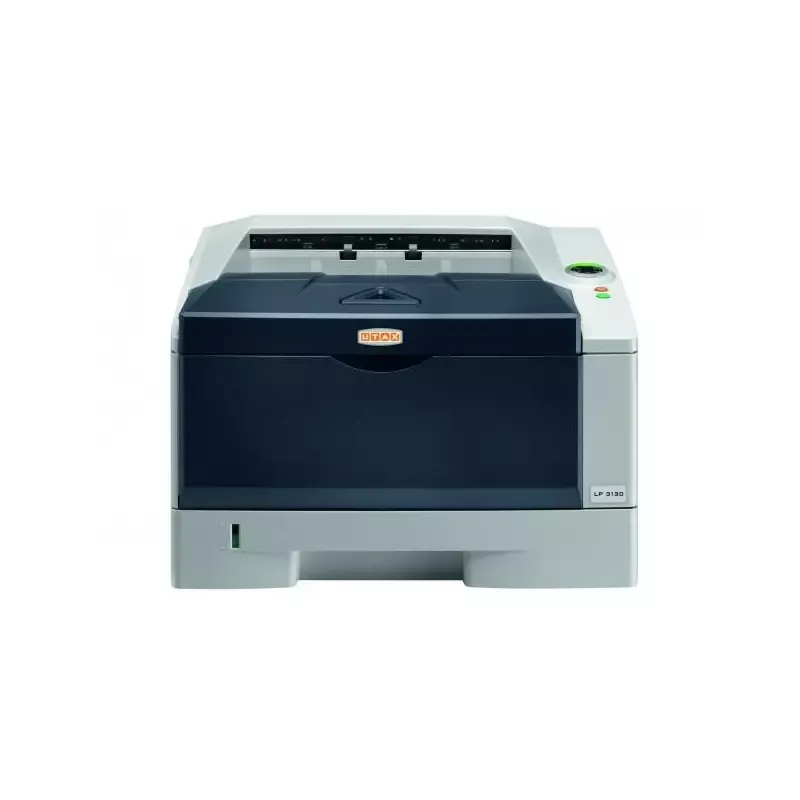

More product categories from brand Utax
More product types from brand Utax

Presentation of product P-6035i MFP specifications from brand Utax
General Information
The Utax P-6035i MFP model is a multifunction printer from the Utax brand, known for its innovation and quality in the field of office devices. This model is designed to deliver high performance, meeting the demands of a professional environment.
Print Speed
Equipped with laser printing technology, the Utax P-6035i MFP ensures remarkable print quality with vibrant colors and sharp text. Its print speed reaches 60 pages per minute (ppm) for black prints, making it particularly efficient for daily tasks. The maximum resolution of 600 x 600 DPI guarantees exceptionally clear prints. Additionally, it supports duplex printing, optimizing paper usage with a speed of 25 ppm for this feature. The warm-up time is 25 seconds, and the first page is printed in just 8 seconds.
Copier
The integrated copier allows for color copies at a resolution of 600 x 600 DPI, ensuring faithful results. With a copy speed of 60 copies per minute (cpm) for black and white documents, it is perfectly suited for daily printing needs. The copy resizing function ranges from 25 to 400%, providing flexibility in the size of copied documents. The maximum number of copies that can be made is 999, which is ideal for high volumes.
Scanning
The color scanning of the Utax P-6035i MFP allows for high-quality reproductions with an optical resolution of 600 x 600 DPI. It also offers various scanning options, including modes like E-mail, File, Image, and USB. Supported image formats include JPG and TIF, while text formats such as PDF and XPS are also supported. With 256 levels of gray, scanning provides detailed shades, and CCD technology ensures optimal speed and quality.
Fax
The fax system of the Utax P-6035i MFP allows for quick sending and receiving of documents. The fax resolution is 200 x 100 DPI, ensuring sufficient clarity for sent documents. With a transmission speed of 3 seconds per page and a fax memory of 8 MB, this printer guarantees efficiency in managing communications. Features such as automatic callback for missed calls and delayed fax sending add to the convenience of use.
Features
The maximum service cycle is suitable for intensive use, meeting the needs of demanding users. The printer is configured to primarily print in black, with optimal print quality.
Input and Output Capacity
The paper feed capacity of the Utax P-6035i MFP is 500 sheets, allowing for high document volume management without frequent interruptions. The output capacity is also 500 sheets, ensuring consistent performance.
Paper Management
This printer supports ISO A series paper sizes, with a maximum size of A4. The weight range for media varies from 60 to 220 g/m², which is ideal for different types of documents. It is also compatible with envelopes and other standard formats.
Design
The Utax P-6035i MFP features a modern design, available in black and gray, and is primarily intended for professional use, with features tailored to the needs of businesses.
Network
It is equipped with Ethernet/LAN connectivity, allowing for fast communications. However, it does not have Wi-Fi connectivity. Its data transfer rate is 10/100/1000 Mbit/s, ensuring efficient connections within a network.
Connectivity
The printer offers a direct printing function, facilitating printing from various devices. It is equipped with standard interfaces and a USB port for simple and quick connection.
Representation / Performance
With an internal memory of 512 MB, the Utax P-6035i MFP is capable of handling a significant volume of data. Its built-in memory card reader allows for reading and writing data directly on SD cards. Additionally, its noise level in standby is 57 dB, ensuring discreet use.
Power
In operation mode, the power consumption is 803 W, while it drops to 70.8 W in standby, contributing to energy savings. The input voltage is 220 to 240 V with a frequency of 50 Hz, ensuring optimal compatibility with standard electrical systems.
Minimum System Requirements
The Utax P-6035i MFP is compatible with Windows operating systems, ensuring a smooth user experience.
Weight and Dimensions
Its dimensions are 475 mm in width, 455 mm in depth, and 590 mm in height, with a weight of 23.3 kg, which may make its movement and installation somewhat challenging.


