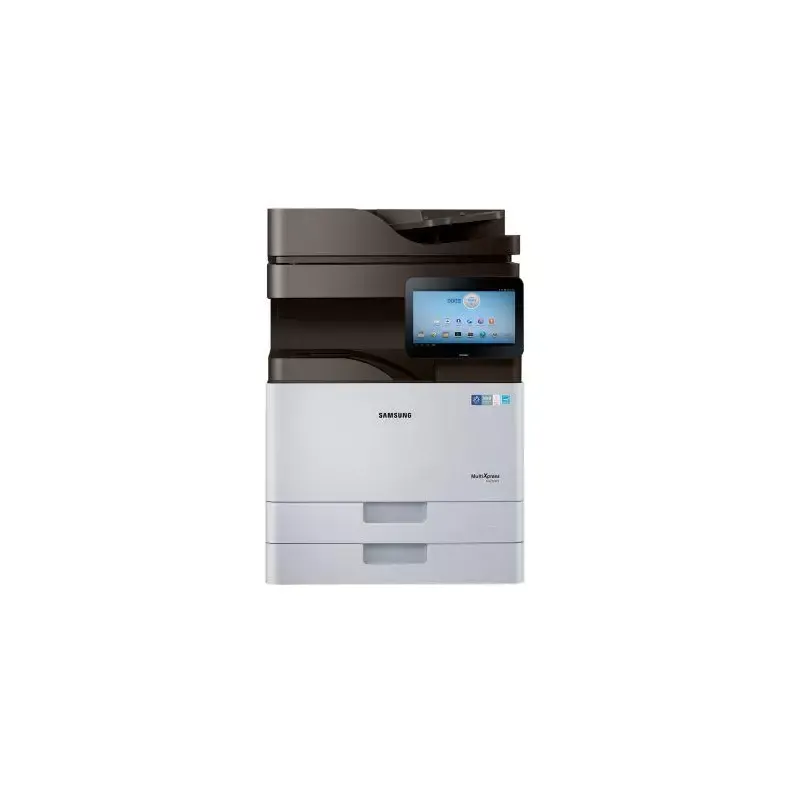

Manual of product Xpress SL-K4250RX
Editorial note
The Samsung Xpress SL-K4250RX printer stands out for its impressive performance, offering a printing speed of 25 pages per minute and a maximum resolution of 1200 x 1200 DPI. These features make it an ideal choice for professional use, ensuring high-quality and fast prints. Additionally, its built-in duplex printing functionality helps optimize paper usage, which is a significant advantage for users looking to reduce costs. However, some drawbacks are worth noting. Weighing 61.7 kg, moving the printer can be challenging, especially in tight spaces. Furthermore, the sound pressure level of 50 dB during printing may be perceived as too loud in noise-sensitive environments. The lack of Wi-Fi connectivity also limits wireless printing options, which could disappoint users seeking flexibility. Finally, the cost of replacement toners can be high, impacting the total cost of ownership. In terms of user experience, the setup is facilitated by a well-detailed manual, and the varied connectivity options, including Ethernet and USB port, enhance the experience. The printer's robust design is suited for heavy use, which is a plus for demanding work environments. Overall, the Samsung Xpress SL-K4250RX is an excellent choice for professionals, despite some limitations to consider.Score details
User experience
The user experience is generally positive thanks to well-thought-out features, but the weight of the printer can make it difficult to move.
Performance
The printing performance is excellent with a speed of 25 ppm and a maximum resolution of 1200 x 1200 DPI, ideal for professional use.
Design
The design is robust and suitable for heavy use, but its weight may be a drawback for some users.
Value for money
The cost of replacement toners can be high, which impacts the total cost of use, despite quality printing performance.
Features
The duplex printing feature and varied connectivity, including Ethernet and USB, enhance the user experience.
Documentation
The user manual is comprehensive and well-detailed, making it easy to get started with the product.
Advantages
Fast printing up to 25 pages per minute.
Laser print quality up to 1200 x 1200 DPI.
Built-in duplex printing to save paper.
Color scanning up to 4800 x 4800 DPI.
Ethernet and USB connectivity for various devices.
Robust design for 100,000 pages per month.
Disadvantages
High weight, difficult to move.
Printing noise of 50 dB.
No Wi-Fi connectivity.
High cost of toners.
Copy resolution limited to 600 DPI.
Technical Specifications Xpress SL-K4250RX
General Information
-
ModelXPRESS SL-K4250RX
-
Brand
-
Category
-
Type
-
SKU273669
-
MPN273669
Print speed
-
Printing technologyLaser
-
PrintingMonochrome printing
-
Print speed (black, normal quality, A4/US Letter)25 ppm
-
Maximum resolution1200 x 1200 DPI
-
Copy time for the first page (Black, normal)8.5 s
-
Double-sided printingYes
Copier
-
CopySimple copy
-
Max. resolution of copies600 x 600 DPI
-
Copy speed (normal quality, black, A4)25 cpm
-
Resizing copy25 - 400 %
-
Maximum number of copies9999 copies
-
Release time of the first print (black, normal)6.2 s
Digitization
-
DigitizationColor scanning
-
Optical scanning resolution600 x 600 DPI
-
Maximum scanning resolution4800 x 4800 DPI
-
Type of scannerADF scanner
-
Scan toE-mail, FTP, SMB
-
Scanner speed (black)45 ppm
-
Scanner speed (black)45 ppm
-
Duplex scanning speed (black)18 ppm
-
Duplex scanning speed (black)18 ppm
-
Scan driversSANE, TWAIN
Fax
-
Fax-
-
Fax resolution (black)600 x 600 DPI
-
Modem speed33.6 Kbit/s
-
Caller IDYes
-
Caller IDYes
-
Caller IDYes
Features
-
Digital sender-
-
Service cycle (Maximum)100,000 pages per month
-
Languages of the page descriptionPCL 5e, PCL 6, PostScript 3
Representation / realization
-
Built-in memory card reader-
-
Processor frequency1000 MHz
-
Internal memory4096 MB
-
Internal storage capacity320 GB
-
Sound pressure level (copy)53 dB
-
Sound pressure level (impression)50 dB
-
Sound pressure level (silent mode)30 dB
Input and output capacity
-
Total power capacity1140 sheets
-
Paper feed typeCassette
-
Maximum input capacity2180 sheets
-
Automatic Document Feeder (ADF) production capacity100 sheets
-
Total output capacity500 sheets
-
Automatic Document Feeder (ADF) production capacity100 sheets
-
Multifunctional trayYes
Paper management
-
Maximum ISO A series paper sizeA3
-
Type of paper tray supportBond paper
-
Types of multi-purpose binsGlossy paper
-
ISO, Format Series A (A0...A9)Heavy paper
-
Plain paper
-
Recycled paper
-
Thick paper
-
Thin paper
-
Bond paper
-
Envelopes
-
Glossy paper
-
Heavyweight paper
-
Labels
-
Plain paper
-
Preprinted forms
-
Recycled paper
-
Thick paper
-
Thin paper
-
A3
-
A4
Design
-
ScreenLCD
-
Screen size10.1 "
-
Product colorBlack, White
-
Built-in screenYes
-
Market positionProfessional
Network
-
Wifi-
-
Mobile printing technologies-
-
Ethernet/LANYes
Connectivity
-
USB portYes
-
Standard interfacesEthernet, USB 2.0
-
Optional connectivityWireless LAN
-
USB portYes
Power
-
Electricity consumption (average operation)W
Minimum system requirements
-
Support for the Linux operating systemYes
-
Support for the Linux operating systemYes
-
Support for the Linux operating systemYes
Weight and dimensions
-
Width566 mm
-
Depth610 mm
-
Height829 mm
-
Weight61700 g
Other features
-
Recommended monthly print volume5000 pages
Frequently Asked Questions
What is the weight of the Samsung Xpress SL-K4250RX printer?
What is the recommended method for removing jammed paper from the printer?
Why is my printer not recognizing the original cartridges?
What could be the reasons for poor print quality?
How does a laser printer differ from an inkjet printer?
Why does my inkjet printer leave black streaks on prints?
What does the acronym DPI mean?
What is the size of the screen on the Samsung Xpress SL-K4250RX?
What is the height of the Samsung Xpress SL-K4250RX model?
What is the width of the Samsung Xpress SL-K4250RX printer?
What is the depth of the Samsung Xpress SL-K4250RX?
What is the storage capacity of the Samsung Xpress SL-K4250RX printer?
Is the manual for the Samsung Xpress SL-K4250RX available in French?
Similar products




More product categories from brand Samsung
Television and multimedia Samsung
Home appliances Samsung
Household appliances Samsung
Phones Samsung
Audio Samsung
Other Samsung
Interior Samsung
Tools Samsung
Software Samsung
More product types from brand Samsung


Presentation of product Xpress SL-K4250RX specifications from brand Samsung
General Information
The Samsung Xpress SL-K4250RX is a multifunction printer from the Samsung brand, known for its innovation and reliability in the electronics sector. This model, identified by the EAN code 8806086013581, stands out for its high performance and ease of use, thus meeting the demands of professional users.
Print Speed
Equipped with laser printing technology, the Samsung Xpress SL-K4250RX excels in producing high-quality documents. With color printing capability, it delivers vibrant and precise results. Its print speed reaches 25 pages per minute (ppm) in black and white, facilitating daily printing tasks. Its maximum resolution of 1200 x 1200 DPI ensures clear and detailed prints. Additionally, the first page print time is only 8.5 seconds, enhancing its efficiency. The built-in duplex printing function also helps save paper by optimizing its use.
Copier
The copier of the Samsung Xpress SL-K4250RX is capable of producing color copies with a maximum resolution of 600 x 600 DPI. It ensures a copying speed of 25 copies per minute (cpm) in black and white, making this process quick and efficient. The model allows resizing of copies from 25% to 400%, offering appreciated flexibility, while the maximum capacity of 9999 copies meets intensive printing needs.
Scanning
This printer also offers color scanning features, with an optical resolution of 600 x 600 DPI and a maximum resolution of 4800 x 4800 DPI, ensuring faithful reproductions of documents and images. The ADF (Automatic Document Feeder) scanner allows for quick processing of multiple pages. With a scanning speed of 45 ppm for color and black documents, as well as a duplex scanning option at 18 ppm, this printer is suitable for demanding work environments.
Fax
The Samsung Xpress SL-K4250RX also includes a fax function, offering a resolution of 600 x 600 DPI for clear transmissions. Its modem speed is 33.6 Kbit/s, allowing for effective communication. The automatic redial and caller ID features further enhance the user experience.
Specifications
The maximum duty cycle of this printer is 100,000 pages per month, making it particularly suitable for heavy use. As for supported page formats, it is compatible with PCL 5e, PCL 6, and PostScript 3 standards.
Performance / Execution
The frequency of its processor is 1000 MHz, with an internal memory of 4096 MB and an internal storage capacity of 320 GB. This ensures smooth performance for data processing. The sound pressure level is 50 dB during printing, ensuring relatively quiet operation.
Input and Output Capacity
The total paper capacity is 1140 sheets, with a maximum input capacity of up to 2180 sheets. The automatic document feeder (ADF) can handle 100 sheets, optimizing document processing efficiency. The output capacity is 500 sheets.
Paper Management
This printer supports ISO A series paper formats, up to A3, and is compatible with various types of media, including plain paper, envelopes, and recycled paper. The multi-purpose tray allows for flexible use tailored to different printing requirements.
Design
The Samsung Xpress SL-K4250RX features a 10.1-inch LCD screen that facilitates user interaction. Its modern design, with black and white finishes, easily integrates into professional environments.
Network
It is equipped with Ethernet connectivity, allowing for simple integration into corporate networks. Although it does not have Wi-Fi, it supports various mobile printing technologies for convenient access to printing tasks from mobile devices.
Connectivity
The Samsung Xpress SL-K4250RX offers direct printing options via a USB port and standard interfaces ensuring easy integration with other devices.
Power
In terms of power consumption, the printer is designed to operate efficiently, although specific figures are not provided.
Minimum System Requirements
This printer is compatible with Windows, Mac, and Linux operating systems, ensuring broad accessibility for users across different platforms.
Weight and Dimensions
With dimensions of 566 mm in width, 610 mm in depth, and 829 mm in height, as well as a weight of 61.7 kg, it is designed for business use, although its weight may complicate its mobility.
Other Features
The recommended monthly print volume is 5000 pages, ensuring optimal performance for regular use.


