

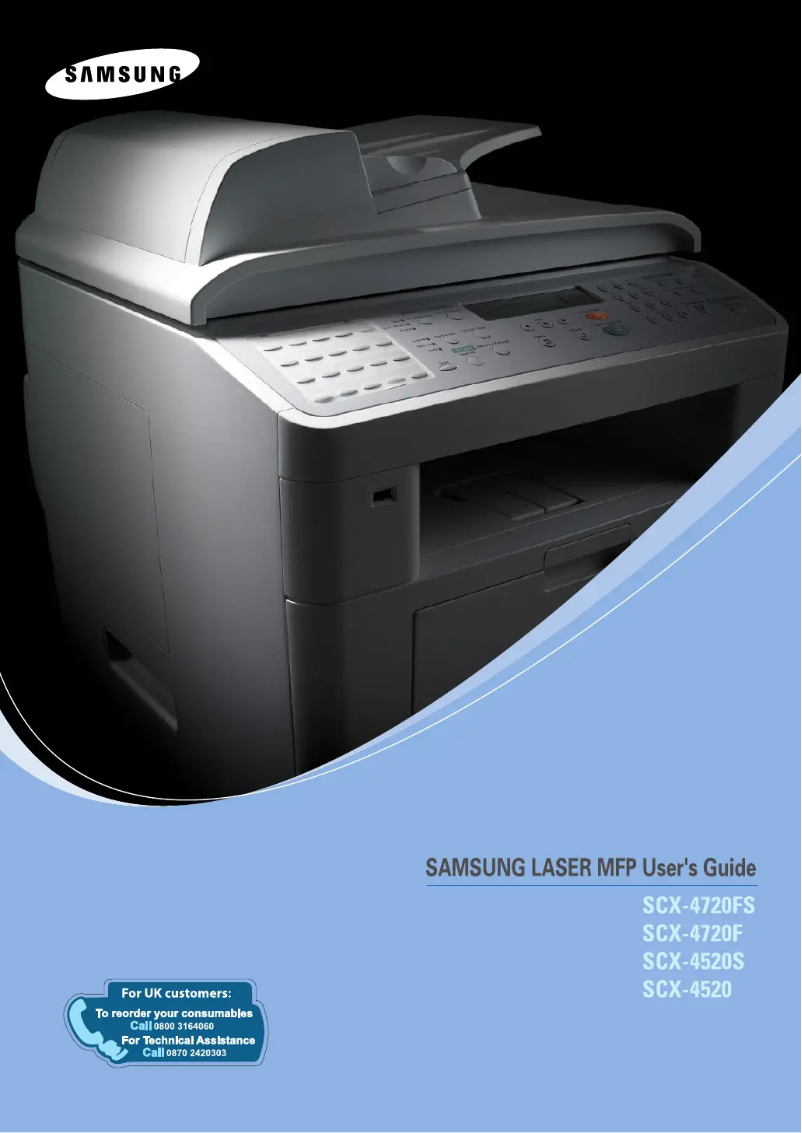
Manual of product SCX-4720FN
Editorial note
The Samsung SCX-4720FN is a multifunction printer that stands out for its fast printing speed of 22 pages per minute, ideal for demanding work environments. Its all-in-one features, including faxing, scanning, and copying, add valuable versatility, meeting various office needs. Additionally, the maximum scanning resolution of 4800 x 4800 DPI ensures images of exceptional clarity, while the economical printing feature helps reduce costs while maintaining optimal quality. However, this product has some drawbacks. Its incompatibility with Mac operating systems may limit its use for some users, and its weight of 17 kg can make transport and installation difficult, especially in tight spaces. The operating noise level of 55 dB may also be perceived as bothersome in very quiet environments. In terms of performance, the internal memory of 32 MB is sufficient for basic tasks but may prove inadequate for more demanding applications. Regarding user experience, the score of 78 indicates general satisfaction, despite some limitations. The value for money is rated good with a score of 80, especially due to the economical printing feature. The provided documentation is comprehensive, offering a useful resource for users. However, the maximum service cycle of 15,000 pages per month may not meet the needs of offices with very high printing volumes. In summary, the Samsung SCX-4720FN is a solid option for users looking for a fast and efficient multifunction printer, provided they take into account its limitations in terms of compatibility and noise.Score details
User experience
The user experience is generally positive due to the fast printing speed and all-in-one features, although limited compatibility with Mac systems may pose a problem for some users.
Performance
Performance is good for everyday tasks, but the 32 MB internal memory may be insufficient for more demanding applications, thus limiting the product's capabilities in certain scenarios.
Design
The design is functional, but the relatively high weight of 17 kg can complicate transport and installation in tight spaces.
Value for money
The value for money is good, especially thanks to the economical printing feature that reduces costs while maintaining optimal quality.
Robustness
The maximum service cycle of 15,000 pages per month is suitable for intensive use, but may not meet the needs of offices with very high printing volumes.
Usability
The all-in-one functions, including fax, scan, and copy, provide appreciated versatility, but the noise level of 55 dB can be disturbing in very quiet work environments.
Support
The product is supported by a comprehensive user manual, but the lack of compatibility with Mac systems could limit support for some users.
Documentation
The provided documentation is extensive with a 322-page manual, offering a good resource for users.
Advantages
Fast printing at 22 pages per minute.
Scanning up to 4800 x 4800 DPI.
Cost-effective printing to reduce expenses.
Monthly capacity of 15,000 pages.
All-in-one functions: fax, scan, copy.
Disadvantages
Not compatible with Mac
High weight: 17 kg
Noise level of 55 dB
Insufficient internal memory of 32 MB
Duty cycle limited to 15,000 pages
Technical Specifications SCX-4720FN
General Information
-
ModelSCX-4720FN
-
Brand
-
Category
-
Type
-
SKU1385511
-
MPN1385511
Representation / realization
-
Internal memory32 MB
-
Sound pressure level (impression)55 dB
-
Sound power level (standby)39 dB
-
Mac CompatibilityNo
-
Maximum internal memory160 MB
Print speed
-
Print speed (black, normal quality, A4/US Letter)22 ppm
-
Printing technologyLaser
-
Economic printingYes
-
Copy time for the first page (Black, normal)10 s
-
PrintingNo
Features
-
Number of print cartridges1
-
Languages of the page descriptionPCL 6
-
Service cycle (Maximum)15000 pages per month
-
Digital senderNo
Digitization
-
Maximum scanning resolution4800 x 4800 DPI
-
Maximum scan area216 x 356 mm
-
Type of scannerFlatbed scanning
-
Optical scanning resolution600 x 1200 DPI
-
Scanner featuresTwain, WIA
-
DigitizationColor scanning
Copier
-
Max. resolution of copies600 x 600 DPI
-
Copy speed (normal quality, black, A4)22 cpm
-
Maximum number of copies99 copies
-
CopyNo
Other features
-
Accepted types of mediaPlain Paper
-
Standard average formatsTransparency
-
Compatible operating systemsLabel
-
I/O PortsPost Card
-
Network featuresEnvelope
-
Ready-to-use networkLetter
-
Dimensions (LxWxH)A4
-
Memory increaseLegal
-
Scale or enlargement change rate of the imageFolio
-
All-in-one functionsExecutive
-
All-in-one color functionsB5
-
A5
-
A6
-
Envelopes 6-3/4
-
7-3/4
-
#9
-
#10
-
DL
-
C5
-
B5
-
Windows 98/Me/2000/XP/NT 4.0
-
Linux Systems
-
USB 2.0
-
IEEE-1284 Parallel
-
Ethernet (RJ-45)
-
10/100Base-TX Ethernet
-
Yes
-
475 x 437 x 416.5 mm
-
Yes Go
-
25 – 400%
-
Fax
-
Scan
-
scan
-
n
Fax
-
Modem speed33.6 Kbit/s
-
Automatic reminderYes
-
Maximum number of shortcuts for numbers200
-
Fax Memory16 MB
-
Fax speed (A4)3 sec/page
-
FaxSimple fax
Input and output capacity
-
Total output capacity150 sheets
-
Maximum input capacity250 sheets
Weight and dimensions
-
Weight17000 g
Power
-
Electricity consumption (average operation)400 W
-
Energy consumption (eco mode)30 W
Sustainability
-
Sustainability certificatesENERGY STAR
Environmental conditions
-
Operating temperature10 - 32 °C
Design
-
Market positionDomestic and professional
Frequently Asked Questions
What is the weight of the Samsung SCX-4720FN printer?
What is the recommended method for removing a paper jam in the printer?
Why is my printer not recognizing the original cartridges?
Why is the quality of my prints poor?
What is the difference between a laser printer and an inkjet printer?
Why does my inkjet printer leave black streaks on prints?
What does the acronym DPI mean?
How many cartridges can be installed in the Samsung SCX-4720FN?
Is the manual for the Samsung SCX-4720FN available in French?
Similar products




More product categories from brand Samsung
Television and multimedia Samsung
Home appliances Samsung
Household appliances Samsung
Phones Samsung
Audio Samsung
Other Samsung
Interior Samsung
Tools Samsung
Software Samsung
More product types from brand Samsung


Presentation of product SCX-4720FN specifications from brand Samsung
General Information
The Samsung SCX-4720FN printer represents the excellence of the Samsung brand, known for its innovation and reliability in the electronics sector. This model, SCX-4720FN, offers optimal performance, making the user experience enjoyable. Thanks to its unique EAN code (0635753619041, 8808979722723, 8808979722747, 8808979722716, 8808979722600, 8808979722693), it is easily identifiable in the distribution system.
Representation / Performance
With an internal memory of 32 MB, the SCX-4720FN printer ensures efficient data and application management, thus ensuring smooth usage. Its operating sound pressure level is 55 dB, making it suitable for work environments where silence is appreciated. In standby mode, the sound level is reduced to 39 dB, providing a commendable discretion. It is worth noting that this device is not compatible with Mac systems. The maximum internal memory can reach 160 MB, allowing for the storage of larger files.
Print Speed
The SCX-4720FN stands out with its print speed of 22 pages per minute in black and white mode, ideal for frequent printing tasks. Equipped with laser printing technology, it guarantees high print quality and precise results. Additionally, it offers an economical printing function, helping to reduce printing costs while maintaining optimal quality. The first page print time is quick, taking only 10 seconds. This printer also supports color printing, providing vibrant documents and images.
Features
The SCX-4720FN uses a single print cartridge, making it easy to use. It supports PCL 6 page description languages, ensuring better adaptation to various user needs. With a maximum service cycle of 15,000 pages per month, this device is designed to meet the demands of intensive work environments. However, it does not have a digital sending function.
Scanning
In terms of scanning, the SCX-4720FN offers a maximum resolution of 4800 x 4800 DPI, ensuring images of exceptional clarity. Its maximum scan area is 216 x 356 mm, allowing for easy handling of large documents. The flatbed scanner enables efficient and fast scanning, with an optical resolution of 600 x 1200 DPI. Twain and WIA functionalities provide flexibility of use, while color scanning allows for faithful reproductions.
Copier
This model offers a maximum copy resolution of 600 x 600 DPI, ensuring high-quality prints. Its copy speed reaches 22 copies per minute in normal quality, providing appreciable efficiency for daily printing. The device can make up to 99 copies at a time and also offers a color copy function.
Other Features
The SCX-4720FN accepts various types of media, such as plain paper, transparencies, labels, postcards, and envelopes. It is compatible with several standard formats, including A4, Letter, and Legal, ensuring versatility for different applications. Regarding connectivity, it works with Windows XP, Vista, and 7 operating systems, and has USB 2.0, parallel IEEE-1284, and Ethernet (RJ-45) ports. The printer's dimensions are 475 x 437 x 416.5 mm, allowing it to fit easily into various workspaces.
Fax
The SCX-4720FN is equipped with a modem with a speed of 33.6 Kbit/s, ensuring a fast connection for faxing needs. The automatic redial feature helps not to miss important calls, and it can store up to 200 shortcuts for fax numbers. Its fax memory of 16 MB allows for the storage of multiple documents, and the faxing speed is 3 seconds per page.
Input and Output Capacity
With an output capacity of 150 sheets and a maximum input capacity of 250 sheets, the SCX-4720FN is designed to efficiently handle a considerable volume of documents.
Weight and Dimensions
Power
The average power consumption during operation is 400 W, while in economy mode, it reduces to 30 W, thus offering appreciable energy efficiency.
Durability
The Samsung SCX-4720FN is ENERGY STAR certified, ensuring that it meets high standards for energy efficiency and environmental respect.
Environmental Conditions
It operates within a temperature range of 10 to 32 °C, allowing it to adapt to different work environments.
Design
This model is intended for both home and professional use, with features tailored to the varied needs of users.


