

Manuals of product TX-40CS620E

Editorial note
The Panasonic TX-40CS620E is a television that stands out for its Full HD image quality (1920 x 1080 pixels), offering an immersive visual experience, ideal for watching movies, series, or playing video games. With a viewing angle of 176°, it allows for comfortable viewing from different angles, perfect for family or friends' evenings. Additionally, its annual energy consumption of only 69 kWh and its A+ energy efficiency rating help reduce electricity costs while being environmentally friendly. However, it has some drawbacks. Its Full HD resolution may seem outdated compared to competitors offering 4K models, which can affect image quality for high-definition content. Furthermore, the lack of Smart TV features limits access to streaming apps and the Internet, thus restricting entertainment options. Although the built-in speakers provide a pleasant audio experience with several sound modes, their power of 20 W may not satisfy audiophiles looking for high-quality sound. Finally, connectivity is an area where the Panasonic TX-40CS620E could be improved, particularly due to the absence of DVI ports and built-in PC connectors, which limits options for some users. Despite these drawbacks, the television remains a solid option for those looking for a reliable device for standard use.Score details
User experience
The Full HD image quality (1920 x 1080 pixels) offers an immersive visual experience, ideal for watching movies, series, or playing video games. With a viewing angle of 176°, the Panasonic TX-40CS620E allows for comfortable viewing from different angles, which is perfect for family or friends' gatherings.
Performance
The Full HD resolution may seem outdated compared to 4K models from competitors, offering lower image quality for high-definition content. However, the model ensures optimal performance for standard use.
Battery life
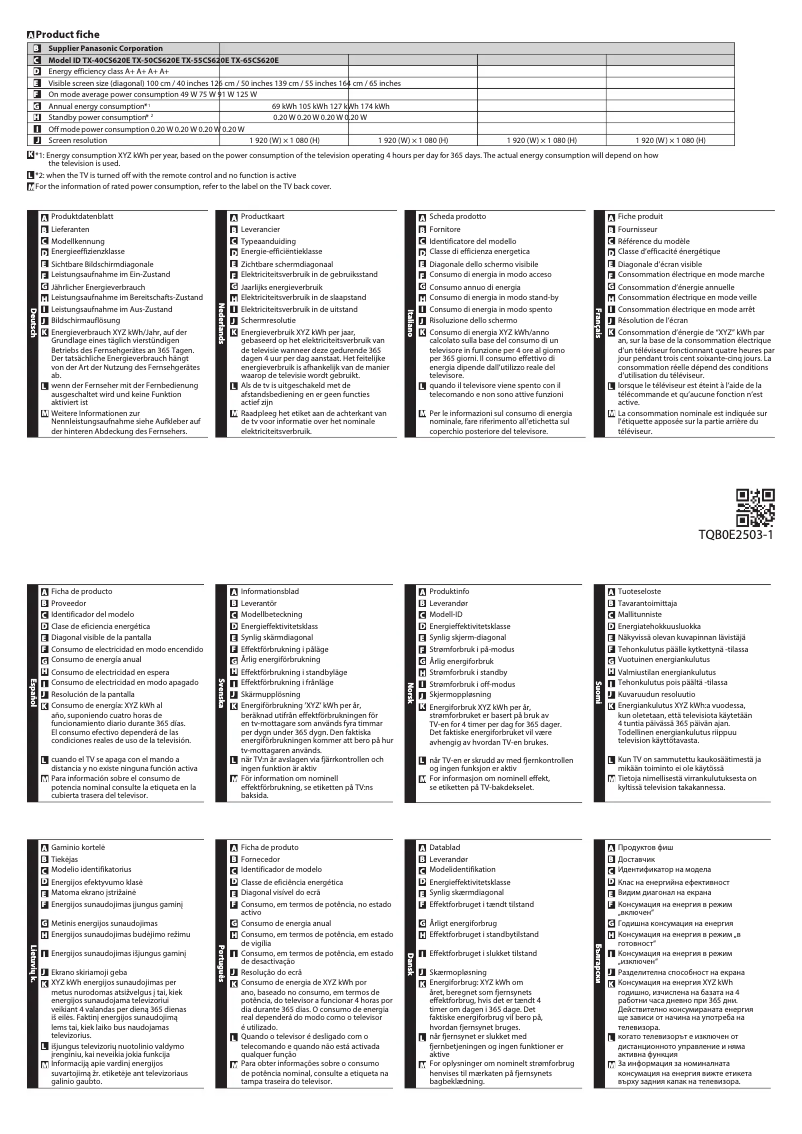
The annual energy consumption of only 69 kWh and its A+ energy efficiency rating help reduce electricity costs while being environmentally friendly.
audio
The built-in speakers provide a pleasant audio experience, with several sound modes to adapt to different types of content. However, the audio power of 20 W may seem insufficient for high-quality sound enthusiasts.
Features
The multiple HDMI and USB ports allow for easy connection of various multimedia devices, providing great flexibility for your entertainment needs. However, the lack of Smart TV features limits access to streaming apps and the Internet.
connectivity
The absence of DVI ports and built-in PC connectors limits connectivity options for some users, which can be a drawback for those seeking greater versatility.
Advantages
Immersive Full HD image quality
Wide viewing angle of 176°
Energy consumption of 69 kWh
Environmentally friendly A+ energy class
Built-in speakers with sound modes
Multiple HDMI and USB ports available
Disadvantages
No support for 3D
No Smart TV features
Obsolete Full HD resolution
Limited connectivity without DVI ports
Insufficient audio power of 20 W
Technical Specifications TX-40CS620E
General Information
-
ModelTX-40CS620E
-
Brand
-
Category
-
Type
-
SKU864571
-
MPN864571
Screen
-
LED backlighting-
-
Screen size40 "
-
Type HDFull HD
-
Screen resolution1920 x 1080 pixels
-
Screen brightness- cd/m²
-
Response time- ms
-
Vertical viewing angle176 °
-
Vertical viewing angle176 °
-
Screen diagonal (cm)100 cm
-
Screen shapeFlat
-
Interpolation movement technologyBMR 200 Hz
-
Image format16:9
Other features
-
3D CompatibilityNo
-
Certified DLNA (Digital Living New-York Alliance)Yes
-
Annual energy consumption69 kWh
-
Energy efficiency class (old)A+
-
Certified DLNA (Digital Living New-York Alliance)Yes
TV Tuner
-
Tuner typeAnalog and digital
-
Analog signal format systemNTSC, PAL, SECAM
-
Digital signal system formatDVB-C, DVB-T, DVB-T2
Smart TV / smart TV
-
Smart TV-
-
Internet TV-
Audio
-
Number of speakers2
-
Rated power of RMS20 W
-
Sound modesCustom
-
Music
-
Standard
Connectivity
-
Quantity of HDMI ports3
-
Common Interface (CI)No
-
Common Interface Plus (Cl+)Yes
-
Common Interface (CI)No
-
S-Video Input0
-
Quantity of USB 2.0 Ports2
-
S-Video Input0
-
Headset output1
-
Headset output1
-
Headset output1
-
Common Interface (CI)No
-
Common Interface Plus (Cl+)Yes
-
S-Video Input0
-
Headset output1
Network
-
WifiYes
-
WifiYes
Management features
-
On-Screen Display (OSD)Yes
-
On-Screen Display (OSD)Yes
-
Number of OSD languages26
Representation / realization
-
Teletext1000 pages
-
Game ModeYes
-
Game ModeYes
Design
-
Built-in power button-
-
Product colorMoney
-
VESA mountYes
Power
-
Electricity consumption (stop)0.2 W
-
Typical electricity consumption49 W
-
Electricity consumption (stop)0.2 W
-
AC input voltage220 - 240 V
-
AC input frequency50 - 60 Hz
Weight and dimensions
-
Device width (support included)904 mm
-
Depth (without support)47 mm
-
Height (without support)518 mm
-
Weight (without support)10500 g
-
Device width (support included)904 mm
-
Depth (support included)202 mm
-
Height (support included)560 mm
-
Weight (with support)12000 g
Packaging information
-
Package width1302 mm
-
Package depth124 mm
-
Package height647 mm
-
Package weight15000 g
Packaging contents
-
Remote control providedYes
Frequently Asked Questions
What is the recommended viewing distance for my Panasonic television?
What should I do if my television is no longer receiving a signal?
What are the dimensions of the screen on my television?
What does the acronym HDMI stand for?
Is it possible to connect devices from different brands via Bluetooth?
What is the screen size of the Panasonic TX-40CS620E?
What is the resolution of the screen on the Panasonic TX-40CS620E?
Does the Panasonic TX-40CS620E support 3D?
What is the display resolution of the Panasonic TX-40CS620E?
What is the viewing angle of the Panasonic TX-40CS620E?
How many HDMI ports are available on the Panasonic TX-40CS620E?
What is the RMS power rating of the built-in speakers of the Panasonic TX-40CS620E?
How to troubleshoot common issues with the Panasonic TX-40CS620E television?
How to automatically adjust the picture format on the Panasonic TX-40CS620E television?
What to do if I get a black and white image on the Panasonic TX-40CS620E television?
How to reduce noise and improve picture quality on the Panasonic TX-40CS620E television?
What to check if the picture quality of the Panasonic TX-40CS620E is disturbed by nearby electrical equipment?
Is the manual for the Panasonic TX-40CS620E available in French?
Similar products


More product categories from brand Panasonic
Home appliances Panasonic
Phones Panasonic
Audio Panasonic
Camera and photography Panasonic
Personal care Panasonic
Other Panasonic
Tools Panasonic
Interior Panasonic
More product types from brand Panasonic








Presentation of product TX-40CS620E specifications from brand Panasonic
General Information
The Panasonic TX-40CS620E is a television from the renowned brand Panasonic, known for its innovation and quality in the home appliance sector. This model, identified by the EAN code 5025232812271, ensures optimal performance and an enhanced user experience.
Screen
This television features a 40-inch screen, providing an ideal size for comfortable viewing. It offers a Full HD resolution of 1920 x 1080 pixels, guaranteeing an immersive image quality. With a viewing angle of 176° both horizontally and vertically, it allows for pleasant viewing from different angles, perfect for family evenings. The flat screen is also equipped with a BMR 200 Hz motion interpolation technology, improving the fluidity of displayed images.
Other Features
The Panasonic TX-40CS620E does not support 3D technology. However, it is equipped with built-in speakers that provide an immersive audio experience, with several sound modes (Custom, Music, Standard) to suit your preferences. Its annual energy consumption is 69 kWh, with an energy rating of A+, helping to reduce electricity costs. Additionally, it is DLNA certified, ensuring compatibility with other multimedia devices.
TV Tuner
The television is equipped with an analog and digital tuner, compatible with several signal format systems such as NTSC, PAL, and SECAM for receiving analog signals, as well as DVB-C, DVB-T, and DVB-T2 for digital.
Smart TV
The Panasonic TX-40CS620E does not integrate Smart TV features, which limits access to online streaming applications or services.
Audio
With 2 speakers and an audio power of 20 W, this model ensures satisfactory sound quality for users, although audiophiles may find it lacking. The different sound modes allow for customization based on the type of content being viewed.
Connectivity
The Panasonic TX-40CS620E is equipped with 3 HDMI ports and 2 USB 2.0 ports, offering numerous connection options for your multimedia devices. It also includes an Audio Return Channel (ARC) to facilitate connection with other audio equipment. However, there is no built-in PC connector (D-Sub) or DVI ports, which may limit certain connectivity options.
Network
This model supports Ethernet/LAN connection as well as Wi-Fi, allowing for a stable and fast network connection.
Management Features
The television is equipped with an electronic program guide and an on-screen display (OSD) in 26 languages, making it user-friendly for a wide audience.
Representation / Realization
The Panasonic TX-40CS620E supports a teletext of 1000 pages, providing access to real-time information such as news and television programs. It also features a game mode to optimize performance during gaming sessions.
Design
This television sports a silver color, adding a modern touch to your interior. It is compatible with VESA mounting, facilitating wall installation.
Power
In terms of energy consumption, the Panasonic TX-40CS620E uses 49 W in normal operation, with a standby consumption of 0.2 W. It is designed to operate on an input voltage of 220 - 240 V and a frequency of 50 - 60 Hz.
Weight and Dimensions
The dimensions of the television are 904 mm wide, 518 mm high, and 47 mm deep without the stand. With the stand, the total depth is 202 mm and the height is 560 mm. Its weight is 10,500 g without the stand and 12,000 g with the stand.
Packaging Information
The package of the Panasonic TX-40CS620E measures 1302 mm wide, 124 mm deep, and 647 mm high, weighing a total of 15,000 g, ensuring adequate protection during transport.
Package Contents
The television comes with a remote control for easy control of its features.


