

Manual of product MC561
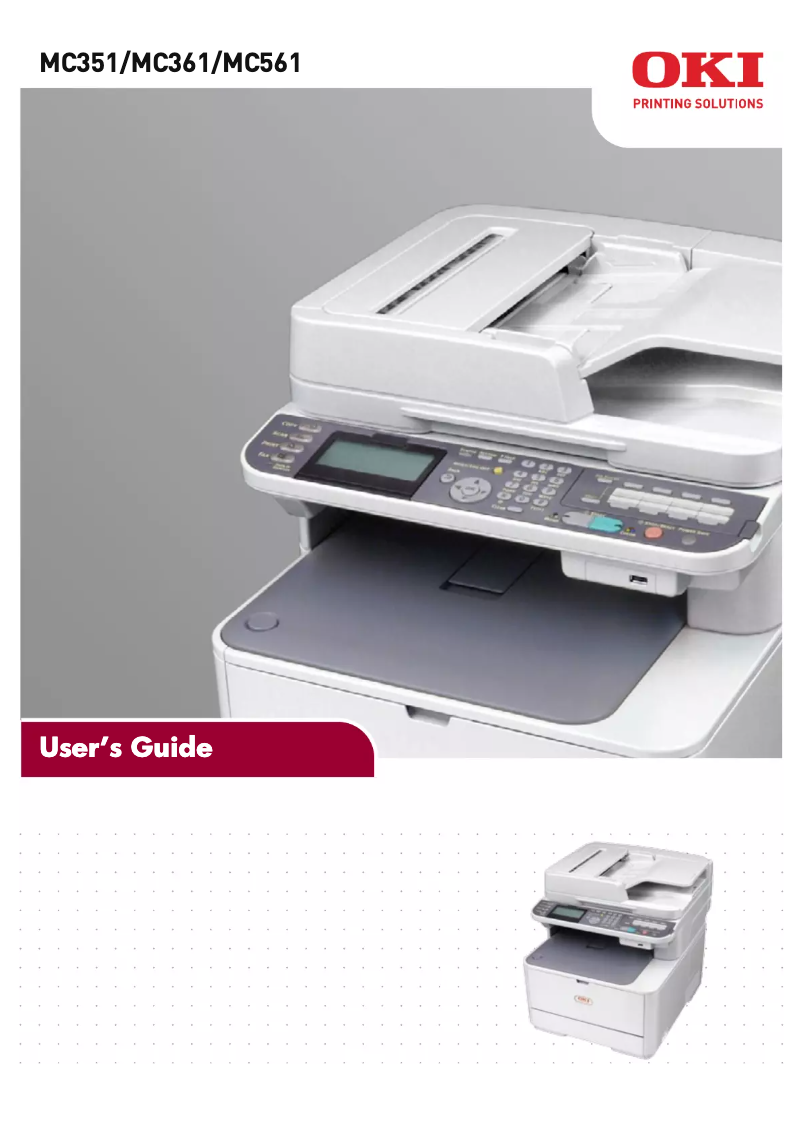
Editorial note
The OKI MC561 printer stands out for its speed and performance, with print speeds reaching 31 pages per minute in black and 27 pages per minute in color, making it an ideal choice for daily professional use. Its 3.5-inch touchscreen makes it easy to navigate through the various functions, thus enhancing the user experience. Additionally, its all-in-one features, including printing, copying, faxing, and scanning, offer versatility that meets various office needs. However, purchasing this printer can represent a considerable investment for small businesses or occasional users, as its cost is relatively high. Furthermore, the lack of Wi-Fi connectivity limits usage flexibility, forcing users to physically connect to print or scan documents. It is also worth noting that the weight of 29 kg can make it difficult to move, particularly in tight spaces, and its noise level could be disruptive in noise-sensitive environments. In terms of robustness, the OKI MC561 is designed for heavy use, with a maximum duty cycle of 60,000 pages per month, but it may not be ideal for Mac users due to its limited compatibility. In summary, while the OKI MC561 offers impressive features and excellent performance, it is essential to consider the constraints related to its cost, weight, and noise level before making a choice.Score details
User experience
The user experience is enhanced by a 3.5-inch touchscreen that facilitates navigation through the various functions of the device.
Performance
The performance is excellent, with print speeds of up to 31 ppm in black and 27 ppm in color, ideal for professional use.
Features
The all-in-one features, including printing, copying, faxing, and scanning, offer versatility suited to various office needs.
Design
The design is functional with a touchscreen, but the weight of 29 kg can make it difficult to move in tight spaces.
Value for money
The purchase cost can be high for small businesses or occasional users, representing a significant investment.
Support
The lack of Wi-Fi connectivity limits usage flexibility, forcing users to physically connect to print or scan.
Robustness
The product is designed for heavy use, with a maximum service cycle of 60,000 pages per month, but the noise level can be disruptive in certain environments.
Advantages
Fast printing up to 31 pages per minute
All-in-one features: printing, copying, faxing, scanning
Built-in duplex printing for paper savings
Print resolution of 1200 x 600 DPI
Maximum duty cycle of 60,000 pages
Intuitive 3.5-inch touchscreen
Disadvantages
High purchase cost for small businesses
No Wi-Fi connectivity available
Limited compatibility with Mac
Heavy weight, difficult to move
Potentially annoying noise level
Technical Specifications MC561
General Information
-
ModelMC561
-
Brand
-
Category
-
Type
-
SKU860384
-
MPN860384
Print speed
-
Printing technologyLaser
-
Black print resolution1200 x 600 DPI
-
Print speed (black, normal quality, A4/US Letter)31 ppm
-
Print speed (color, normal quality, A4/US Letter)27 ppm
-
Black print resolution1200 x 600 DPI
-
Copy time for the first page (Black, normal)7.5 s
-
Copy time for the first page (color, normal)8 s
-
PrintingColor printing
-
Double-sided printingYes
Other features
-
All-in-one functionsCopy
-
All-in-one color functionsFax
-
Dimensions (LxWxH)Print
-
Scan
-
copy
-
print
-
scan
-
427 x 509 x 444 mm
Features
-
Service cycle (Maximum)60000 pages per month
-
Languages of the page descriptionPCL 5c, PCL 6, PostScript 3, SIDM
-
Digital senderNo
Copier
-
Max. resolution of copies600 x 600 DPI
-
Copy speed (normal quality, black, A4)31 cpm
-
Copy speed (normal quality, color, A4)27 cpm
-
Maximum number of copies99 copies
-
Resizing copy25 - 400 %
-
Release time of the first print (black, normal)12 s
-
Release time of the first print (color, concept)14 s
-
CopyColor copy
Digitization
-
Optical scanning resolution1200 x 1200 DPI
-
Type of scannerFlatbed scanning
-
Scan toE-mail, FTP, USB
-
Supported image formatsBMP, GIF, JPG, PNG, TGA, TIF
-
DigitizationColor scanning
Fax
-
Fax resolution (black)200 x 400 DPI
-
Fax transmission speed3 sec/page
-
Modem speed33.6 Kbit/s
-
Fax memory200 pages
-
Fax Memory4 MB
-
Fax transmission100 localizations
-
Fax with Dual accessYes
-
FaxSimple fax
Input and output capacity
-
Total power capacity350 sheets
-
Maximum input capacity880 sheets
-
Input capacity of multi-purpose trays100 sheets
-
Total number of power supply units2
-
Total output capacity150 sheets
-
Multifunctional trayYes
Paper management
-
Maximum print format216 x 356 mm
-
Type of paper tray supportBanner, Envelopes, Plain paper
-
ISO, Format Series A (A0...A9)A4, A5, A6
-
ISO, Formats Series-B (B0...B9)B5
-
Non-ISO print support sizesExecutive
-
Envelope sizes9, 10, C5, DL
-
Weight of paper tray support64 - 176 g/m²
-
Weight of the multifunctional tray support64 - 220 g/m²
-
Weight of the media, automatic document feeder60 - 105 g/m²
-
Maximum ISO A series paper sizeA4
Design
-
ScreenLCD
-
Screen size3.5 "
-
Built-in screenYes
-
Built-in screenYes
-
Market positionProfessional
-
Order typeTouchscreen
Connectivity
-
USB portYes
-
Standard interfacesEthernet, USB 2.0
-
Quantity of USB 2.0 Ports1
-
USB portYes
Network
-
Ethernet/LANYes
-
WifiNo
Representation / realization
-
Internal memory256 MB
-
Maximum internal memory768 MB
-
Compatible memory cardsSD
-
Mac CompatibilityYes
-
Processor frequency533 MHz
-
Sound pressure level (copy)55.5 dB
-
Sound pressure level (impression)54 dB
-
Mac CompatibilityYes
Power
-
Electricity consumption (average operation)570 W
-
Energy consumption (eco mode)20 W
Weight and dimensions
-
Weight29000 g
Minimum system requirements
-
Support for the Windows operating systemWindows 2000
-
Support for the Mac operating systemWindows 2000 Professional
-
Support for the server operating systemWindows 7 Home Premium
-
Windows 7 Home Premium x64
-
Windows 7 Professional
-
Windows 7 Professional x64
-
Windows 7 Starter
-
Windows 7 Starter x64
-
Windows 7 Ultimate
-
Windows 7 Ultimate x64
-
Windows Vista Business
-
Windows Vista Business x64
-
Windows Vista Home Basic
-
Windows Vista Home Basic x64
-
Windows Vista Home Premium
-
Windows Vista Home Premium x64
-
Windows Vista Ultimate
-
Windows Vista Ultimate x64
-
Windows XP Home
-
Windows XP Home x64
-
Windows XP Professional
-
Windows XP Professional x64
-
Mac OS X 10.3 Panther
-
Mac OS X 10.4 Tiger
-
Mac OS X 10.5 Leopard
-
Mac OS X 10.6 Snow Leopard
-
Mac OS X 10.7 Lion
-
Windows 2000 Advanced Server
-
Windows Server 2003
-
Windows Server 2003 x64
-
Windows Server 2008
-
Windows Server 2008 R2
-
Windows Server 2008 x64
Sustainability
-
Sustainability certificatesENERGY STAR
Frequently Asked Questions
What is the weight of the OKI MC561 printer?
What is the recommended method for removing paper jammed in the printer?
Why does my printer not recognize original cartridges?
What could be the causes of poor print quality?
How is a laser printer different from an inkjet printer?
Why does my inkjet printer leave black streaks on prints?
What does the acronym DPI mean?
What is the size of the screen on the OKI MC561?
Is the manual for the OKI MC561 available in French?
Similar products


More product categories from brand OKI
More product types from brand OKI


Presentation of product MC561 specifications from brand OKI
General Information
The OKI MC561 is a multifunction printer from a brand recognized for its innovation and quality in the printing device sector. Its model, identified by the code MC561 | 62435801, is designed to deliver high performance. The EAN code 0051851093048 allows for unique identification in distribution systems.
Print Speed
Equipped with Laser printing technology, the OKI MC561 ensures exceptional print quality with a maximum resolution of 1200 x 600 DPI. It achieves speeds of up to 31 pages per minute in black and 27 pages per minute in color, making it ideal for intensive professional use. Duplex printing is also integrated, allowing for efficient paper management.
All-in-One Features
This printer offers various features, including printing, copying, faxing, and scanning, making it a versatile tool for office needs. Its dimensions of 427 x 509 x 444 mm ensure easy integration into different workspaces.
Capabilities and Technical Specifications
With a maximum duty cycle of 60,000 pages per month, the OKI MC561 is designed to meet the demands of heavy users. It supports multiple page description languages such as PCL 5c, PCL 6, and PostScript 3, ensuring great compatibility.
Copier
The maximum resolution for copies is 600 x 600 DPI, and the copying speed reaches 31 copies per minute in black and 27 copies per minute in color. With a maximum of 99 copies and a resizing feature ranging from 25 to 400 %, this device meets various printing needs.
Scanning
Scanning is performed with an optical resolution of 1200 x 1200 DPI. The flatbed scanner allows for quick scanning of multiple documents and supports various formats such as BMP, GIF, JPG, and TIF. Color scanning ensures faithful reproductions.
Fax
The fax operates with a resolution of 200 x 400 DPI and a transmission speed of 3 seconds per page. The fax memory of 200 pages facilitates the management of sending and receiving, with a storage capacity of 4 MB.
Paper Management
The total feed capacity is 350 sheets, with a maximum input capacity reaching 880 sheets. The multifunction tray allows for flexible use, while the media dimensions range from 64 to 220 g/m².
Design and Interface
The product features a 3.5-inch LCD screen with an intuitive touch interface, making navigation through the various features easy. Its design is primarily oriented towards professional use.
Connectivity
Although the OKI MC561 has Ethernet/LAN connectivity, it does not support Wi-Fi, which may limit usage flexibility. A USB 2.0 port is also present for quick connection to various devices.
Power Consumption
The average power consumption during operation is 570 W, while in energy-saving mode, it is reduced to 20 W, promoting more energy-efficient use.
Weight and Dimensions
With a weight of 29 kg, the OKI MC561 is designed for stationary use, which may make its relocation more complicated.
Durability
Certified ENERGY STAR, the OKI MC561 meets high standards for energy efficiency and environmental impact.


