

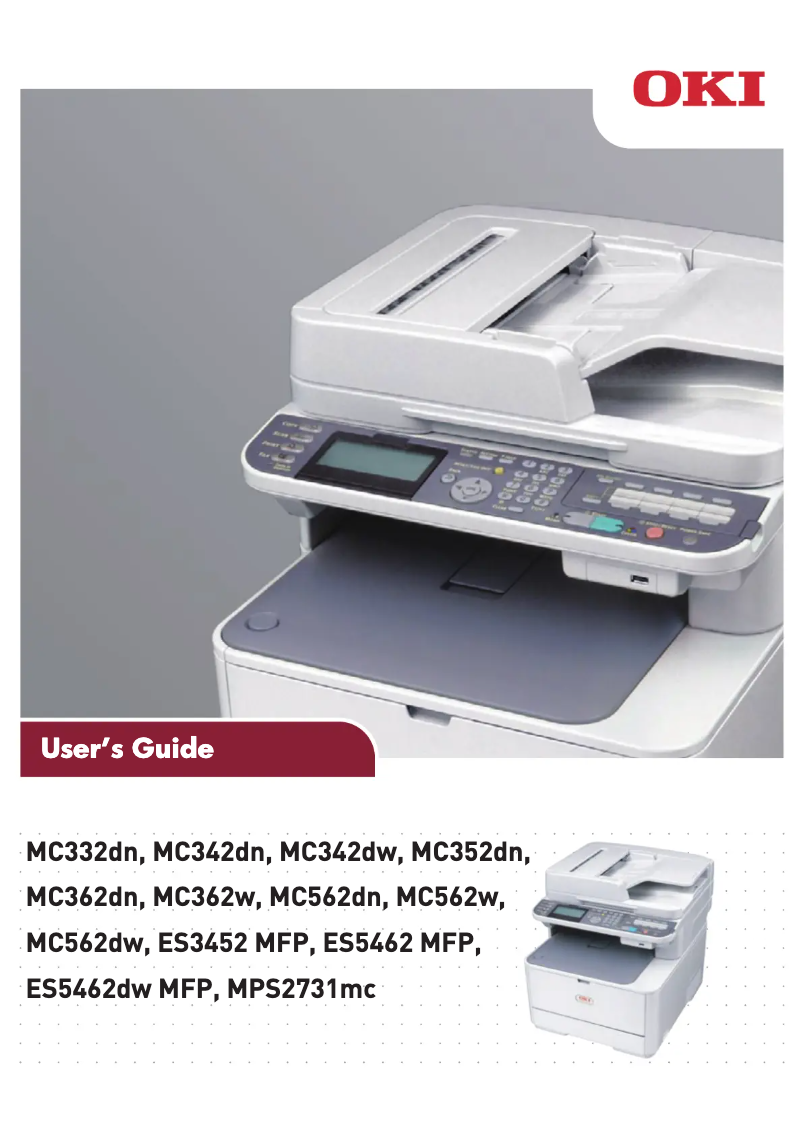
Manual of product ES5462 MFP
Editorial note
The OKI ES5462 MFP multifunction printer stands out for its impressive performance, including a printing speed of 30 ppm in black and 26 ppm in color, making it an ideal choice for demanding work environments. Its printing resolution of 1200 x 1200 DPI ensures results of remarkable clarity and vibrant colors, perfect for professional documents. Additionally, the maximum paper capacity of 880 sheets reduces interruptions for reloads, thereby increasing efficiency during printing tasks. However, the weight of 29 kg may pose challenges in terms of mobility and installation, particularly in offices where frequent relocation is necessary. Although the device offers automatic duplex printing, the lack of Wi-Fi connectivity limits certain modern wireless printing options, which can be a drawback for users seeking greater flexibility. In terms of user experience, the OKI ES5462 MFP effectively combines printing, copying, scanning, and faxing, offering appreciable versatility. However, the complexity of some features may require an adjustment period, especially for those who prefer a simple interface. Overall, while the OKI ES5462 MFP has some limitations, it offers good value for money considering its many features and print quality, making it a relevant choice for professionals.Score details
User experience
The user experience is good thanks to the combination of printing, copying, scanning, and faxing, providing appreciable versatility.
Performance
With a printing speed of 30 ppm in black and 26 ppm in color, the performance is optimal for demanding work environments.
Battery life
Although the device is not portable, its generous paper capacity of 880 sheets minimizes interruptions for reloading, increasing efficiency.
Design
The design is functional, but the weight of 29 kg can make moving and installing it difficult in offices.
Value for money
The OKI ES5462 MFP offers good value for money considering its multifunction features and print quality, despite some limitations.
Features
Features like automatic duplex printing and a print resolution of 1200 x 1200 DPI are major assets, although the lack of Wi-Fi limits some modern options.
Usability
The complexity of the features may require an adjustment period for users, especially those seeking ease of use.
Advantages
Print speed of 30 ppm in black
Print quality up to 1200 x 1200 DPI
Multifunction: printing, copying, scanning, faxing
Built-in automatic duplex printing
Paper capacity of 880 sheets
Disadvantages
Heavy weight, difficult to move.
Limited paper capacity of 880 sheets.
Noise level of 52 dB, sometimes bothersome.
No Wi-Fi connectivity available.
Scanning resolution may be insufficient.
Technical Specifications ES5462 MFP
General Information
-
ModelES5462 MFP
-
Brand
-
Category
-
Type
-
SKU87270
-
MPN87270
Print speed
-
Printing technologyInkjet
-
PrintingColor printing
-
Maximum resolution1200 x 1200 DPI
-
Print speed (black, normal quality, A4/US Letter)30 ppm
-
Print speed (color, normal quality, A4/US Letter)26 ppm
-
Color resolution1200 x 600 DPI
-
Copy time for the first page (Black, normal)7.5 s
-
Copy time for the first page (color, normal)6 s
-
Double-sided printingYes
Copier
-
CopyColor copy
-
Max. resolution of copies600 x 600 DPI
-
Copy speed (normal quality, black, A4)30 cpm
-
Copy speed (normal quality, color, A4)26 cpm
-
Maximum number of copies99 copies
-
Resizing copy25 - 400 %
-
Release time of the first print (black, normal)12 s
-
Release time of the first print (color, concept)14 s
Digitization
-
DigitizationColor scanning
-
Optical scanning resolution1200 x 1200 DPI
-
Scanning speed (color)20 ppm
-
Scanner speed (black)30 ppm
-
Input color display depth48 bit
-
Output color display depth24 bit
-
Gray levels7
Fax
-
Fax-
-
Fax transmission speed3 sec/page
-
Modem speed33.6 Kbit/s
-
Fax Memory4 Mo
-
Maximum number of shortcuts for numbers100
Features
-
Digital sender-
-
Service cycle (Maximum)- pages per month
Input and output capacity
-
Total output capacity250 sheets
-
Maximum output capacity880 sheets
-
Total output capacity250 sheets
-
Maximum output capacity880 sheets
Paper management
-
ISO, Format Series A (A0...A9)A4
-
Maximum print formatA5
-
Type of paper tray supportA6
-
ISO, Formats Series-B (B0...B9)210 x 297 mm
-
ISO Paper Size, Series C Formats (C0…C9)Envelopes
-
Photo paper sizesPhoto paper
-
Maximum ISO A series paper sizeB5
-
C5
-
4x6
-
5x7 "
-
A4
Design
-
ScreenLED
-
Screen resolution320 x 128 pixels
-
Product colorWhite
-
Built-in screenYes
-
Market positionProfessional
Connectivity
-
Direct printing-
-
Standard interfacesUSB 2.0
-
USB portYes
Network
-
Wifi-
-
Mobile printing technologies-
-
Ethernet/LANYes
Representation / realization
-
Internal memory256 MB
-
Built-in memory card readerYes
-
Maximum internal memory768 MB
-
Compatible memory cardsSDHC
-
Processor frequency533 MHz
-
Sound pressure level (scanning)52 dB
-
Sound pressure level (scanning)52 dB
-
Sound pressure level (scanning)52 dB
Power
-
Electricity consumption (average operation)570 W
-
Electricity consumption (stop)0.5 W
-
AC input frequency50 - 60 Hz
-
AC input voltage220 - 240 V
Weight and dimensions
-
Width427 mm
-
Depth509 mm
-
Height444 mm
-
Weight29000 g
Environmental conditions
-
Operating temperature10 - 32 °C
-
Operating relative humidity (H-H)20 - 80 %
-
Temperature out of operation-10 - 43 °C
-
Relative humidity rate (storage)10 - 90 %
Minimum system requirements
-
Support for the Mac operating systemYes
-
Support for the Mac operating systemYes
Frequently Asked Questions
What is the weight of the OKI ES5462 MFP?
What is the recommended method for removing a jammed paper from the printer?
Why is my printer refusing to accept original cartridges?
Why is the quality of my prints poor?
What are the differences between a laser printer and an inkjet printer?
Why does my inkjet printer leave black streaks on prints?
What does the acronym DPI mean?
What is the height of the OKI ES5462 MFP?
What is the resolution of the OKI ES5462 MFP screen?
What is the width of the OKI ES5462 MFP?
What is the depth of the OKI ES5462 MFP?
Is the manual for the OKI ES5462 MFP available in French?
Similar products


More product categories from brand OKI
More product types from brand OKI


Presentation of product ES5462 MFP specifications from brand OKI
General Information
The multifunction printer OKI ES5462 MFP is a well-known model from the brand OKI, recognized for its commitment to quality and innovation in the field of office equipment. This model, referenced under the number 44952254, is designed to deliver optimal performance and enhance the user experience. The EAN code 5031713059806 allows for unique identification within distribution systems.
Print Speed
This printer uses inkjet printing technology, ensuring superior print quality with vibrant colors and precise details. The maximum resolution reaches 1200 x 1200 DPI, ensuring exceptional clarity for all your documents. The black print speed is 30 ppm, while for color prints, it is 26 ppm. Additionally, the first page copy time is 7.5 seconds for black and 6 seconds for color. The device supports automatic duplex printing, which helps reduce paper waste.
Copier
The integrated copier allows for color copies with a maximum resolution of 600 x 600 DPI. It offers a copy speed of 30 cpm in black and 26 cpm in color, enabling efficient handling of printing tasks. The resizing of copies ranges from 25 % to 400 %, and it can make up to 99 copies of an original document.
Scanning
The OKI ES5462 MFP also offers color scanning features, with an optical resolution of 1200 x 1200 DPI. The scanning speed is 20 ppm for color and 30 ppm for black. With an input display depth of 48 bits and 24 bits output, document reproductions are faithful and of high quality.
Fax
This model also includes fax capabilities, with a transmission speed of 3 seconds per page and a modem operating at 33.6 Kbit/s. Its fax memory of 4 MB allows for storing a large number of documents, and it can memorize up to 100 shortcuts for fax numbers.
Input and Output Capacity
The total feed capacity is 250 sheets, while the maximum input capacity reaches 880 sheets, allowing for the management of a large volume of documents without frequent interruptions. The output capacity is also 250 sheets.
Paper Management
The OKI ES5462 MFP is compatible with several paper formats, including ISO sizes from series A (A4, A5, A6) and B (B5), as well as photo sizes. The maximum print format is 210 x 297 mm, which is ideal for various types of documents.
Design
This model is equipped with an LED screen with a resolution of 320 x 128 pixels, providing a clear user interface. With its white finish, it features a modern design suitable for professional environments.
Connectivity
The OKI ES5462 MFP has standard interfaces and a USB port for easy connection to various devices. However, it does not offer Wi-Fi connectivity, which may limit some wireless printing options.
Environmental Conditions
This printer operates optimally within a temperature range of 10 to 32 °C and a relative humidity of 20 to 80 %. The recommended storage conditions are -10 to 43 °C with a relative humidity of 10 to 90 %.
Minimum System Requirements
The OKI ES5462 MFP is compatible with Windows and Mac operating systems, ensuring smooth integration into different work environments.


