

Manual of product MM428
Editorial note
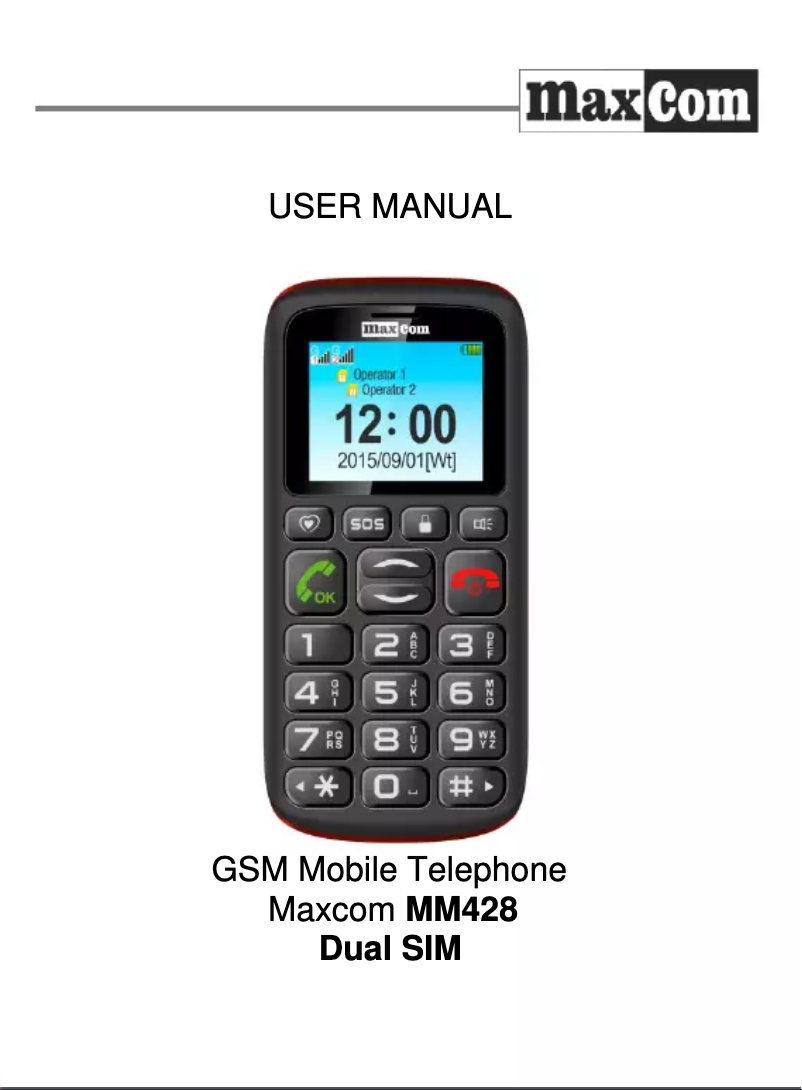
The MaxCom MM428 is a compact and lightweight smartphone, ideal for users looking for a simple and functional device. Weighing only 78 g, it is easy to carry on a daily basis. Its nickel-metal hybrid (NiMH) battery offers solid performance, allowing for up to 5 hours of talk time and 240 hours of standby time, making it a practical choice for extended communications. However, this model has some limitations. The lack of a touchscreen and an external display reduces user interaction, making it less intuitive to use compared to modern smartphones. Additionally, the screen resolution of 160 x 128 pixels may seem outdated, providing poor display quality for visual content. The absence of a rear camera is a major drawback for those who wish to capture photos and videos. In terms of connectivity, the MaxCom MM428 does not support Wi-Fi networks, which limits internet access. Despite this, it offers microSD card support, allowing for storage capacity expansion up to 4 GB, thus meeting the needs of those who require more space for their data. Its speed dial feature makes accessing favorite contacts easier, making communications more efficient. Finally, the modern and sleek design, available in black and red, adds an aesthetic touch to this device while remaining functional. The user manual also provides detailed information for optimal product use, which is a significant advantage. Overall, the MaxCom MM428 proves to be an interesting choice for those looking for a simple and practical phone, despite its limitations.Score details
User experience
The absence of a touchscreen and an external display limits interaction and user experience, making it less intuitive compared to modern smartphones.
Performance
The screen resolution of only 160 x 128 pixels may seem outdated, providing poor display quality for visual content.
Battery life
The nickel-metal hybrid (NiMH) battery technology offers excellent performance and extended battery life, with up to 5 hours of talk time and 240 hours of standby time.
Design
The modern and sleek design, available in black and red, adds an aesthetic touch while remaining functional.
Features
The product does not support Wi-Fi networks, which restricts connectivity options and may make internet access less convenient.
Value for money
The microSD card support allows for storage capacity expansion up to 4 GB, providing more space for your personal data.
Usability
Its speed dial feature makes it easy to access your favorite contacts, making communications more efficient.
Robustness
Compact and lightweight, the MaxCom MM428 weighs only 78 g, making it easy to carry and handle on a daily basis.
Support
The 59-page user manual provides detailed information for optimal use of the product.
Advantages
Compact and lightweight, only 78 g.
NiMH battery, 5 hours of talk time.
Storage expansion with microSD card.
Speed dial for favorite contacts.
Modern design in black and red.
Disadvantages
No touchscreen or external screen
Mediocre screen resolution
No rear camera
No Wi-Fi support
Limited storage to 4 GB
Technical Specifications MM428
General Information
-
ModelMM428
-
Brand
-
Category
-
Type
-
SKU792727
-
MPN792727
Screen
-
External screenNo
-
Screen size1.8 "
-
Screen resolution160 x 128 pixels
-
External screenNo
Memory
-
Flash Card SupportYes
-
Compatible memory cardsMicroSD (TransFlash)
-
Maximum memory card size4 GB
Camera
-
Rear cameraNo
Network
-
WAP-
-
SIM card capacityDual SIM
-
WifiNo
-
Network dataGSM
-
2G band (1st SIM card)900,1800 MHz
-
Mobile network generation2G
Call management
-
Quick numberingYes
Audio
-
Music playerYes
-
Music playerYes
Data transmission
-
BluetoothYes
Messaging
-
E-mail-
-
MMS (Multimedia Messaging Service)Yes
GPS Performance
-
Assisted GPS (A-GPS)No
-
Assisted GPS (A-GPS)No
Video
-
Video call-
Power
-
Battery technology-
-
Battery capacity800 mAh
-
Talk time (2G)5 h
-
Waiting time (2G)240 h
Weight and dimensions
-
Weight78 g
-
Width54 mm
-
Depth13 mm
-
Height116 mm
Registration
-
Registration typeWithout plan
Design
-
TypePhone for seniors
-
Product colorBlack, Red
-
Built-in flashlightYes
Phone features
-
FormatBar
-
Personal Information Management (PIM)Alarm clock
-
Calculator
-
SOS
Frequently Asked Questions
How do I reset my MaxCom MM428?
What should I do if my SIM card is too small for my {brand} phone?
What is the IMEI number?
What are the dimensions of my smartphone's screen?
Can my smartphone's battery explode?
What is the weight of the MaxCom MM428?
What is the size of the MaxCom MM428's screen?
What is the height of the MaxCom MM428?
What is the resolution of the MaxCom MM428's screen?
What is the width of the MaxCom MM428?
What is the depth of the MaxCom MM428?
How do I insert the SIM card into my MaxCom MM428 smartphone?
How do I set up fingerprint unlocking on my MaxCom MM428 smartphone?
How do I take a screenshot on my MaxCom MM428 smartphone?
Can I increase the storage of my MaxCom MM428 smartphone?
How do I enable Wi-Fi calling on my MaxCom MM428 smartphone?
Does the MaxCom MM428 have a touchscreen?
What is the display diagonal of the MaxCom MM428?
Does the MaxCom MM428 have an external display?
Does the MaxCom MM428 support flash memory cards?
Does the MaxCom MM428 have a rear camera?
Is the MaxCom MM428 manual available in French?
Similar products


More product categories from brand MaxCom
More product types from brand MaxCom


Presentation of product MM428 specifications from brand MaxCom
General Information
The MaxCom MM428 is a smartphone from the renowned brand MaxCom, known for its commitment to quality and innovation in the mobile device sector. This model, identified by the code MM428 | MM428BB, is designed to provide satisfactory performance and a refined user experience. Its EAN code, 5908235973630, allows for precise identification in distribution systems.
Screen
The MaxCom MM428 is equipped with a 1.8-inch screen. Although it does not have a touchscreen or an external display, this size ensures adequate viewing for text content and notifications. Its resolution of 160 x 128 pixels may seem limited, offering basic display quality for users.
Memory
Regarding memory, the MaxCom MM428 supports a flash card, allowing for storage expansion via a MicroSD (TransFlash) card up to 4 GB. This provides additional storage capacity, essential for users with specific data needs.
Camera
This model does not include a rear camera, meaning it is not possible to capture photos or videos, a feature that could be a drawback for some users wishing to immortalize moments.
Network
The MaxCom MM428 operates on a single SIM card and uses GSM data to ensure reliable connectivity. It is important to note that it does not support Wi-Fi or the WAP protocol, which limits internet access options. The 2G band (900/1800 MHz) ensures effective voice communications and text messaging, although this may seem outdated for some users.
Call Management
A speed dial feature is present, facilitating immediate access to your favorite contacts, optimizing the calling experience.
Audio
The MM428 model does not have an FM radio, but it is equipped with a music player, allowing you to enjoy your favorite tracks at any time.
Data Transmission
It is also equipped with Bluetooth connectivity, allowing for wireless pairing with other compatible devices, making data sharing more convenient.
Messaging
The MaxCom MM428 supports multimedia messaging service (MMS), enhancing communication with the ability to send multimedia files. However, it does not have a built-in E-mail function.
GPS Performance
This model does not have GPS or A-GPS functionality, which limits navigation and location options for the user.
Video
The MaxCom MM428 does not offer video calling, thus restricting visual communication options.
Power
The battery of the MaxCom MM428 uses nickel-metal hydride (NiMH) technology, offering a capacity of 800 mAh. This allows for up to 5 hours of talk time and 240 hours on standby, ensuring satisfactory autonomy for daily use.
Weight and Dimensions
With a lightweight of 78 g, this smartphone is easy to carry. Its dimensions (54 mm wide, 13 mm deep, and 116 mm high) make it a compact device, ideal for simple handling.
Subscription
The MaxCom MM428 is offered without a plan, providing usage flexibility without commitment.
Design
The design of the MaxCom MM428 is bar-type, available in black and red, giving it a modern look. Additionally, it is equipped with an integrated flashlight, adding a practical feature for users.
Phone Features
This model includes personal information management (PIM) tools such as alarms, a calculator, and a calendar, thus facilitating daily organization.


