

Manual of product 351003
Editorial note
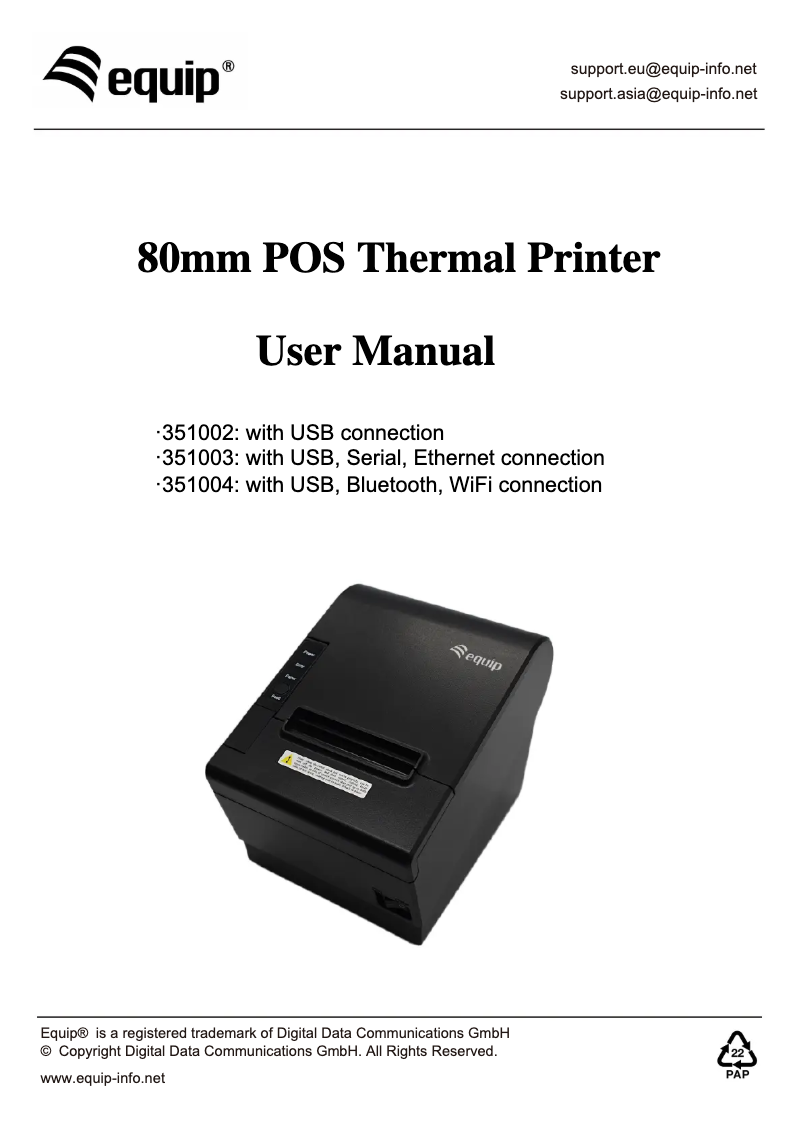
The Equip 351003 printer stands out for its thermal printing technology, ensuring optimal quality with a resolution of 203 x 203 DPI. Its printing speed of 250 mm/sec allows for quick document processing, making it an efficient choice for demanding work environments. Additionally, its compact and modern design facilitates integration into various workspaces, a plus for users concerned about aesthetics. However, some drawbacks should be noted. Wireless connectivity is not available, which may limit its flexibility of use in cable-free environments. Furthermore, compatibility with Mac operating systems is limited, which could pose issues for users of these devices. The maximum paper roll diameter of 80 mm may also reduce available paper options, and the internal memory of only 8 MB might be insufficient for tasks requiring the storage of large amounts of data. Moreover, its weight of 1040 g may make the device less portable for those who need to move it frequently. Overall, the Equip 351003 offers good value for money, with appreciated features such as a built-in cutter and durability certificates. Although some limitations exist, its performance and design make it an interesting choice for many users.Score details
User experience
The user experience is generally positive thanks to thermal printing technology that ensures optimal quality and a resolution of 203 x 203 DPI, although wireless connectivity may limit its use in certain environments.
Performance
With a printing speed of 250 mm/sec, the printer offers increased efficiency. However, the internal memory of only 8 MB may be insufficient for more demanding tasks.
Design
The compact and modern design of the printer allows for easy integration into various workspaces, which is an asset for users concerned about aesthetics.
Features
Although the printer is compatible with several operating systems like Windows and Linux, its limited compatibility with Mac systems and the lack of wireless connectivity may restrict its use.
Value for money
The product offers good value for money with features like a built-in cutter and durability certificates, but some limitations such as the maximum paper roll diameter of 80 mm may be a drawback.
Robustness
The printer is designed to withstand various environmental conditions, but its weight of 1040 g may make it less portable for those who need to move it frequently.
Advantages
Optimal thermal printing quality
Compact and modern design
Fast printing speed of 250 mm/sec
Compatible with Windows and Linux
Built-in cutter for precise cuts
Compliant with RoHS and CE standards
Disadvantages
No wireless connectivity
Limited compatibility with Mac
Maximum paper roll of 80 mm
Internal memory of only 8 MB
Weight of 1040 g not very portable
Technical Specifications 351003
General Information
-
Model351003
-
Brand
-
Category
-
Type
-
SKU1742182
-
MPN1742182
Weight and dimensions
-
Width195 mm
-
Depth145 mm
-
Weight1040 g
-
Height143.3 mm
Packaging information
-
Package height152 mm
-
Package width201 mm
-
Package weight1610 g
-
Package depth230 mm
-
Cables includedAC, RS-232, USB
Logistics data
-
Length of the main locker (external)477 mm
-
Height of the main locker (external)328 mm
-
Product by main locker (external)8 piece(s)
-
Gross weight of the main locker (external)13860 g
-
Width of the main locker (external)425 mm
Features
-
Country of originChina
-
Embedded barcodes1D, 2D, QR Code, EAN13, Code 128 (A/B/C), EAN8, UPC-A, Code 39, UPC-E, ITF, PDF417, Code 93
-
Internal memory8 MB
-
Flash memory4 MB
-
CutterYes
-
Sustainability of the automatic cutter1 million shares
-
Lifespan of the print head100 km
Connectivity
-
Connectivity technologyWith cable
-
Serial interfaceYes
-
Quantity of USB 2.0 Ports1
-
USB connectorUSB Type-B
-
Serial interfaceYes
-
Serial interface typeRJ-11, RS-232
Network
-
Ethernet/LANYes
-
WifiNo
Print speed
-
Printing technologyThermal
-
TypePOS Printers
-
Maximum resolution203 x 203 DPI
-
Print speed (metric measurement)250 mm/sec
-
Character tableASCII
Design
-
Product colorBlack
Power
-
Power supply typeCC
Environmental conditions
-
Operating temperature-10 - 50 °C
-
Temperature out of operation-40 - 70 °C
-
Operating relative humidity (H-H)25 - 80 %
-
Relative humidity rate (storage)0 - 93 %
Minimum system requirements
-
Support for the Windows operating systemWindows 7
-
Support for the Linux operating systemWindows 7 Enterprise
-
Support for the Mac operating systemWindows 7 Enterprise x64
-
Support for the Mac operating systemWindows 7 Home Basic
-
Windows 7 Home Basic x64
-
Windows 7 Home Premium
-
Windows 7 Home Premium x64
-
Windows 7 Professional
-
Windows 7 Professional x64
-
Windows 7 Starter
-
Windows 7 Starter x64
-
Windows 7 Ultimate
-
Windows 7 Ultimate x64
-
Windows 7 x64
-
Windows 8
-
Windows 8 Enterprise
-
Windows 8 Enterprise x64
-
Windows 8 Pro
-
Windows 8 Pro x64
-
Windows 8 x64
-
Windows XP
-
Windows XP Home
-
Windows XP Home x64
-
Windows XP Professional
-
Windows XP Professional x64
-
Ubuntu 12.04
-
Ubuntu 14.04
-
Yes
-
Yes
Technical details
-
Compliance with sustainabilityYes
-
Sustainability certificatesRoHS, CE
Paper management
-
Supported paper width80 mm
-
Supported paper width80 mm
-
Maximum print width72 mm
Packaging contents
-
Quick Start GuideYes
-
Quick Start GuideYes
Frequently Asked Questions
What is the weight of the Equip 351003?
How can I remove the paper jammed in the printer?
Why is my printer not recognizing the original cartridges?
What are the possible reasons for poor print quality?
How does a laser printer differ from an inkjet printer?
Why does my inkjet printer leave black streaks on my prints?
What does the acronym DPI mean?
What is the height of the Equip 351003?
What is the width of the Equip 351003?
What is the depth of the Equip 351003?
Is the manual for the Equip 351003 available in French?
Similar products


More product categories from brand Equip
More product types from brand Equip







Presentation of product 351003 specifications from brand Equip
General Information
The Equip 351003 printer, from the renowned brand Equip, is designed to deliver optimal performance and an enriching user experience. This model is identified by the EAN code 4015867229088, allowing for easy identification in distribution systems. Equip is known for its commitment to innovation and quality in the field of household appliances.
Weight and Dimensions
With a width of 195 mm, a depth of 145 mm, and a height of 143.3 mm, the Equip 351003 is designed to easily fit into various work environments. Its weight of 1040 g ensures easy handling while guaranteeing stability during use.
Packaging Information
The package of the Equip 351003 measures 152 mm in height, 201 mm in width, and 230 mm in depth, with a total weight of 1610 g. These dimensions are optimized for efficient transport and storage. A power cable is included to ensure immediate electrical connection.
Logistics Data
The main case of the Equip 351003 measures 477 mm in length, 425 mm in width, and 328 mm in height, with a gross weight of 13860 g. These specifications facilitate storage and optimization of shipments, with a total of 8 units per case.
Features
Manufactured in China, the Equip 351003 features a variety of barcodes (1D, 2D, QR Code, etc.) for smooth information reading. Its internal memory of 8 MB and flash memory of 4 MB allow for efficient management of the data necessary for its operation. An integrated cutter facilitates precise cuts, while the print head offers a lifespan of 100 km, ensuring appreciable longevity.
Connectivity
The Equip 351003 is equipped with wired connectivity. It includes a USB Type-B port for quick connections and a serial interface (RJ-11, RS-232) for effective communication with other devices. However, it does not offer Wi-Fi connectivity, which may limit its use in cable-free environments.
Network
This printer supports Ethernet/LAN connectivity but does not have Wi-Fi features, which could limit certain usage options.
Print Speed
Featuring thermal printing technology, the Equip 351003 guarantees quality prints with a maximum resolution of 203 x 203 DPI. Its print speed of 250 mm/sec allows for rapid processing, ideal for various professional needs.
Design
The modern design of the Equip 351003 is highlighted by its black color, giving it an elegant appearance that easily integrates into any workspace.
Power
The product operates with a DC power supply, ensuring stable performance and efficient use.
Environmental Conditions
Designed to operate within a temperature range of -10 to 50 °C, the Equip 351003 also withstands non-operating temperatures from -40 to 70 °C. Its operational relative humidity is 25 to 80%, while the storage humidity is 0 to 93%, ensuring its durability in various environments.
Minimum System Requirements
Compatible with multiple operating systems, the Equip 351003 supports various versions of Windows as well as Linux distributions like Ubuntu 12.04 and 14.04. However, it is not compatible with Mac systems.
Technical Details
Meeting durability standards, the Equip 351003 has RoHS and CE certificates, demonstrating its commitment to reducing environmental impact.
Paper Management
This printer is designed to use paper rolls with a maximum diameter of 80 mm, with a supported paper width also of 80 mm. The maximum print width is 72 mm, ensuring quality results for various documents.
Package Contents
The Equip 351003 comes with a power adapter, allowing for immediate use, as well as a quick start guide to facilitate the installation and commissioning of the product.


